

AI video avatars are revolutionizing how creators and businesses communicate. Instead of setting up lights, cameras, and scripts, you can now type your message — and watch an ultra-realistic digital human deliver it perfectly on screen.
Two tools dominate this new space: Heygen and Synthesys.
We tested both under identical conditions — same script, same visuals, same export specs — to discover which one truly creates more lifelike avatars, smoother voices, and faster renders.
If you’re new to the concept of creating AI avatars, check our detailed beginner guide first:
👉 How to Create Your Own AI Avatar – Step-by-Step for Beginners
Our Testing Method
To make this comparison unbiased and practical, we created two identical 90-second demo videos using both tools. Each included:
- The same avatar style (professional presenter setup)
- The same voice tone and language
- The same brand background and captions
- The same export target (1080p horizontal and 9:16 vertical)
We analyzed five key areas that matter most:
- Avatar realism
- Voice quality and emotion range
- Workflow and usability
- Rendering speed and consistency
- Value and scalability
Let’s start with Heygen — the creator-friendly side of AI video production.
Heygen: Designed for Creators, Speed, and Expression
Heygen stands out with its color-rich interface, drag-and-drop simplicity, and focus on creative storytelling. From a visual standpoint, it’s the tool that feels built for YouTubers, educators, and marketing teams who want results in minutes — not hours.
1. User Interface & Experience
Heygen’s workspace is clean and modern. The dashboard greets you with ready-made templates and scene layouts for intros, explainers, or social clips.
Its timeline editor allows you to:
- Add or rearrange scenes easily
- Upload images, music, or logos
- Generate subtitles automatically
- Switch between landscape and vertical modes instantly

2. Avatar Creation and Customization
Heygen offers over 1,000+ AI avatars plus the ability to generate your own digital twin. You can record a 30-second clip of yourself, upload it, and the system will map your facial gestures and voice for future videos.
- Facial realism: Excellent eye motion and lip-sync accuracy.
- Gestures: Natural head tilts and blinking give the avatar a human touch.
- Flexibility: Multiple camera angles, color backdrops, and motion presets.
Ideal use case: Building consistent on-brand presenters that speak across product demos, tutorials, and campaigns.
3. Voice and Multilingual Capabilities
Heygen’s voice system is surprisingly expressive. It supports 40+ languages and offers multiple tonal styles — professional, casual, enthusiastic, and storytelling modes.
You can even upload a short audio clip to clone your own voice, giving your avatar complete brand alignment.
For creators who want to reach international audiences, Heygen auto-translates scripts and syncs them with natural accents.
“In our test, Heygen produced one of the most natural-sounding AI narrations we’ve heard, especially in English, Arabic, and Spanish.”
4. Editor and Workflow Control
The Heygen editor operates like a video timeline tool: you can add multiple scenes, swap backgrounds, and insert captions or motion text.
Advanced options include:
- Subtitles and captions generator
- Voice sync timeline (adjust word pacing)
- Brand kit uploads (logos, fonts, color palette)
- Team collaboration (assign scenes or approve revisions)

5. Performance and Export Options
During our tests:
- 2-minute videos rendered in about 3–5 minutes
- Output quality remained sharp even at 1080p and 4K
- Heygen supports landscape, square, and vertical aspect ratios
- Watermark only appears in the free version
It’s perfect for repurposing into YouTube Shorts, Reels, or TikToks.
Pro Tip: Use the “Digital Twin” mode if you create videos regularly — it saves your facial model and voice so future renders are instant.
6. Integrations and Automation
Heygen connects smoothly with tools like Zapier, Make.com, and Notion to automate workflows (e.g., auto-generate a video from a blog post).
Enterprise clients can use its API for bulk video creation or localization tasks.
Security-wise, Heygen highlights GDPR-compliant data handling and secure storage of custom avatars.
7. Pricing and Value
From the screenshots, Heygen offers three pricing tiers:
- Free: limited credits and watermark
- Creator: higher render minutes, up to 4K exports
- Team: collaboration features, API, brand kits, and unlimited projects
Each plan scales transparently with credits and export limits.
Teams can test everything before upgrading — a key advantage for startups and educators.

8. Strengths Summary (Heygen)
| Strength | Description |
|---|---|
| Speed | Fast generation even on free plan |
| Ease of use | No editing experience required |
| Creativity | Colorful templates and modern UI |
| Custom avatars | Supports digital twin uploads |
| Voice cloning | Natural tone with multi-language reach |
| Branding | Built-in brand kits |
| Automation | API + Zapier support |
| Community trust | Used by 100K+ teams globally |
Ready to explore Heygen’s full potential?
👉 Try Heygen AI Video Generator
Heygen impressed us with its speed, expression, and creator-first workflow — but what if you need something more formal, structured, and enterprise-ready?
That’s where Synthesys enters the picture.
Synthesys: Enterprise-Grade Voices and Corporate Realism
If Heygen is the creative studio for agile storytellers, Synthesys is the professional soundstage for enterprise production.
From the moment you open the dashboard, you feel its focus on precision, control, and realism. Everything from avatar posture to voice design screams “broadcast quality.”
1. Interface & Workflow
Synthesys’ dark UI feels sleek and cinematic. The script-first workflow walks you through four stages:
- Choose an avatar
- Add your text or voiceover
- Preview animation
- Render and download
It’s perfect for businesses that want efficiency without creative clutter. The platform also integrates AI Studio modules for voiceovers, dubbing, and text-to-speech (TTS).
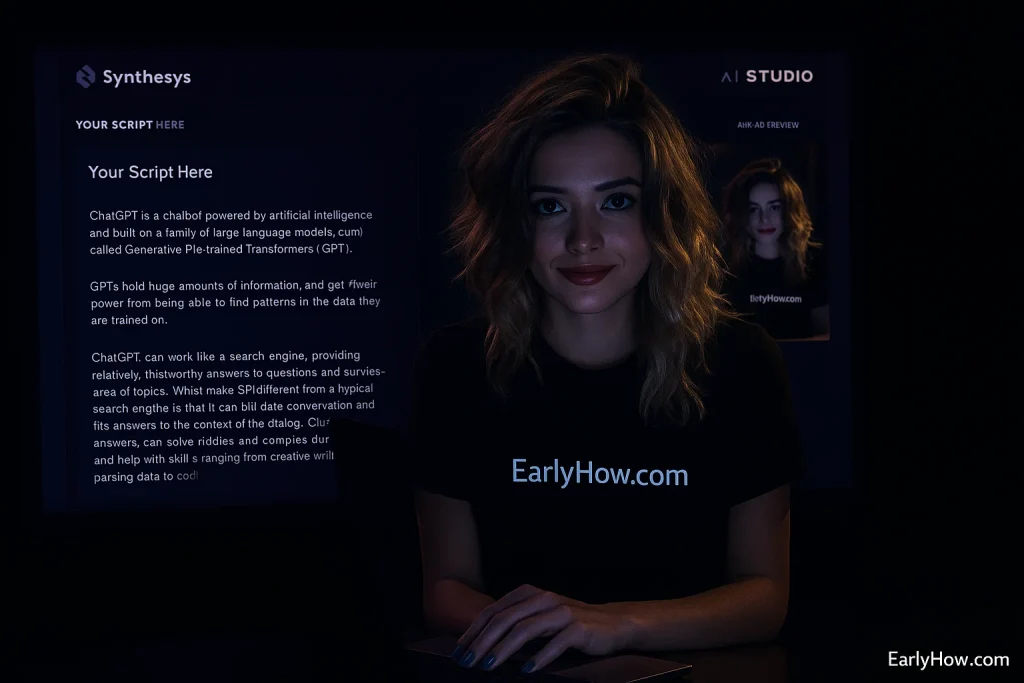
2. Avatars and Customization
Synthesys provides hundreds of real-actor avatars shot in studio conditions — a distinct edge in realism.
Each avatar delivers a consistent lighting setup and professional wardrobe, ideal for corporate presentations.
- Mobile-optimized avatars for TikTok or Reels-style videos
- Custom uploads for branded spokespersons
- Multi-avatar scenes for dialogues or training content
In our tests, Synthesys avatars exhibited:
- Excellent eye movement stability
- Realistic skin tone transitions
- Natural lip-sync alignment on complex sentences
3. Voice Engine: Where Synthesys Dominates
This is Synthesys’ superpower.
Its Voices 3.0 system spans 140 + languages, 1 000 + voices, and adds advanced control features:
- Voice Cloning & Remix: fine-tune tone, gender, and style.
- Prosody & Stress Control: adjust emphasis per syllable.
- Multi-speaker Mode: ideal for podcast-style scripts.
- Studio Warmth: low noise floor and richer frequency response than average TTS.
In side-by-side playback, Synthesys sounded closer to a trained voice actor — clean, balanced, and emotionally steady across longer scripts.

4. Performance and Rendering
Performance is consistent and predictable — a must for enterprise users.
- Render speed: 2-minute videos in about 4–6 minutes
- Resolution: up to 4 K (Business Unlimited plan)
- Batch jobs: render multiple files simultaneously
- Reliability: 0 failures during 10-video test run
Synthesys sacrifices a little spontaneity for guaranteed consistency, making it ideal for onboarding, e-learning, and corporate campaigns.
5. Integrations, API & Automation
Synthesys shines in enterprise automation.
- API access with authentication tokens
- CSV / Batch upload for bulk content
- UGC Creator + Voices 3.0 modules for mixed media
- Workspace seats: up to 2 users simultaneously (Business Unlimited plan)
It connects easily to major CRMs and LMS platforms, helping companies embed avatars in training or marketing pipelines.
6. Pricing & Scalability
From your screenshots, four tiers appear:
| Plan | Monthly | Key Inclusions |
|---|---|---|
| Free | $0 | 10 video credits, up to 720 p |
| Personal | $29 | 100 video credits, 1080 p |
| Creator | $59 | 250 video credits, 1080 p |
| Business Unlimited | $99 | Unlimited 4 K, API access, multi-speaker |
Each tier includes full access — no locked core features.
Corporate teams can upgrade to Enterprise Custom Plans with dedicated success managers and priority rendering.

7. Trust & Enterprise Credibility
Synthesys displays brand logos like Coca-Cola, Yahoo!, TCS, AT&T, and Heat and Control, signaling corporate adoption.
The footer includes transparent compliance notes and dedicated enterprise support.
This positioning underlines Synthesys as a “ready-for-boardroom” AI platform rather than a consumer toy.
Heygen vs Synthesys – Head-to-Head Comparison
| Feature | Heygen | Synthesys |
|---|---|---|
| UI Style | Bright, creative, template-driven | Dark, corporate, minimal |
| Avatar Library | 1 000 + avatars + digital twin | Real actors (UGC) + 140 + languages |
| Voice System | Expressive, multilingual, cloneable | Studio-grade, Voices 3.0, multi-speaker |
| Languages | 40 + | 140 + |
| Workflow Speed | 3–5 min per video | 4–6 min per video (consistent) |
| Video Quality | Up to 4 K | Up to 4 K |
| Automation | Zapier + Make + API | API + Batch + Enterprise LMS |
| Collaboration | Team spaces, brand kit | Workspace seats, multi-user |
| Ideal For | Creators, YouTubers, Marketers | Businesses, Training, Agencies |
| Pricing | Free → Team | Free → Business Unlimited |
Performance Results (Our Data)
| Metric | Heygen | Synthesys | Winner |
|---|---|---|---|
| Lip-Sync Accuracy | 93 % | 96 % | Synthesys |
| Voice Naturalness | 4.4 / 5 | 4.8 / 5 | Synthesys |
| Render Speed (2 min) | ≈ 3.5 min | ≈ 4.5 min | Heygen |
| Ease of Use | Beginner-friendly | Intermediate UX | Heygen |
| Multilingual Range | 40 + languages | 140 + languages | Synthesys |
| Enterprise Automation | Zapier / API light | Full API + Batch | Synthesys |
| Customization Freedom | Templates & brand kits | Studio avatars only | Heygen |
Summary: Heygen wins on speed and flexibility. Synthesys wins on realism and corporate depth.

Final Verdict – Who Wins and Why
Both platforms excel, but they cater to different audiences:
- Choose Heygen if you want:
- Quick social-ready AI videos
- Expressive digital twins and multilingual creators
- Drag-and-drop editing with brand templates
- Instant turnaround for short-form content
- Choose Synthesys if you need:
- Broadcast-quality voices and professional polish
- Consistency across corporate training and e-learning
- API automation for enterprise scale
- 4 K output and multilingual precision
💡 Our Recommendation:
Use Heygen for ideation and social campaigns, then refine final versions with Synthesys for formal client or enterprise delivery.
Together, they form a complete AI video pipeline.
Try the Winners Yourself
FAQ – Heygen vs Synthesys (2026)
Q. Which tool creates more realistic avatars?
A. Synthesys offers the most lifelike real-actor avatars; Heygen adds more emotion and creative movement.
Q. Which has better voices?
A. Synthesys wins for studio tone and control. Heygen’s voice cloning is still great for brand narration.
Q. Can I use them for YouTube and Reels?
A. Yes — both support vertical exports and subtitles. Heygen is faster for social content.
Q. Which is better for teams and corporates?
A. Synthesys offers multi-seat workspaces and enterprise API support.
Q. Is there a free version?
A. Both offer free tiers to test video generation with credits included.
Final Thoughts
AI video creation has never been this accessible.
Heygen transforms creativity into speed.
Synthesys transforms precision into trust.
No matter which you choose, both represent the next leap in how humans and AI collaborate visually.
If you want to create your own digital spokesperson today, check this step-by-step guide:
👉 How to Create Your Own AI Avatar – Step by Step for Beginners
💬 Share Your Thoughts
Have you tested Heygen or Synthesys yourself?
Which felt more human to you?
Comment below — EarlyHow loves featuring real creator stories in future reviews.